 ChatShelf
Find that one message across every AI chat you've had.
ChatGPT, Claude, Gemini and Grok only search conversation titles. ChatShelf indexes every message, so the answer you half-remember is a search away — not a scroll through months of history.
One toolkit for every assistant you use
Search, organize and export across four AI assistants from one place — without sending a single message to a server that isn't already yours.
Full-text search, everywhere
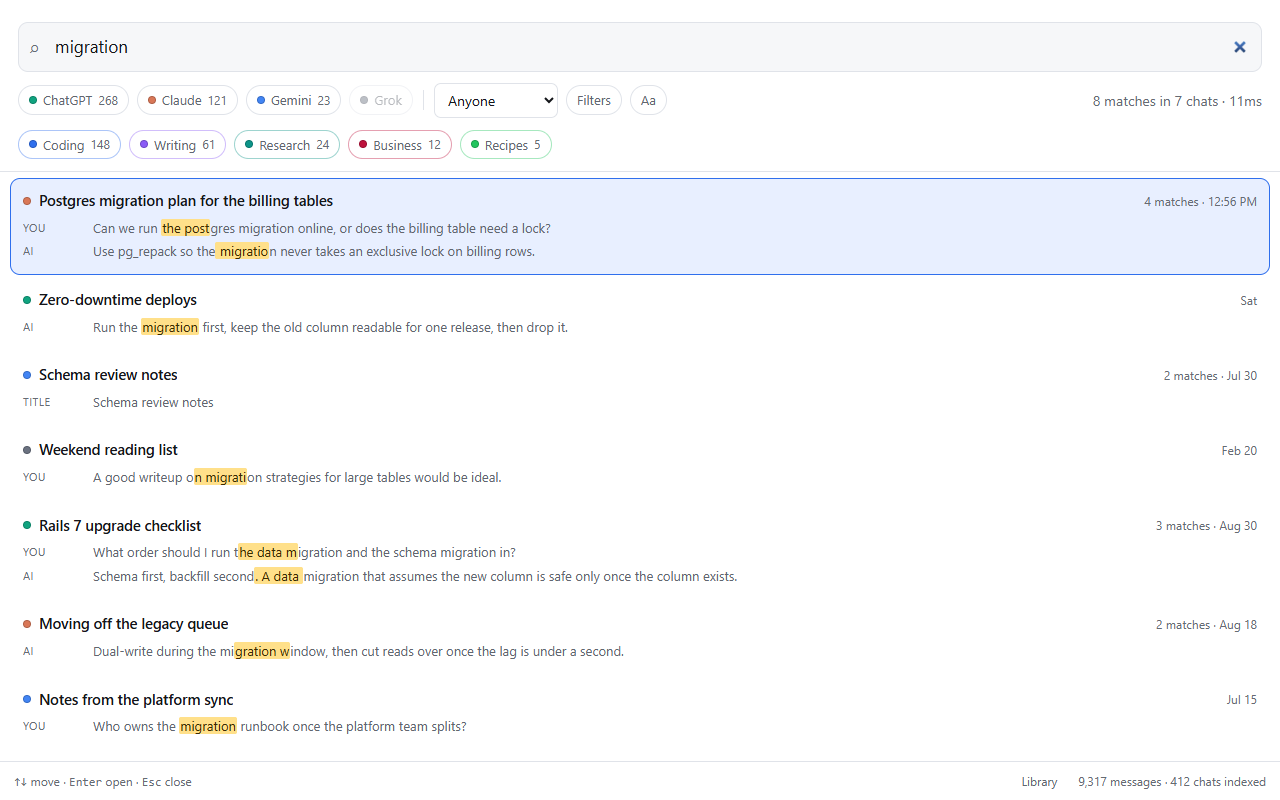
Native search only looks at titles. ChatShelf indexes every message — "quoted phrases", -excluded words, prefix matching, and filters by platform, topic, folder, author or date. Press Ctrl+Shift+F on any chat page to search without leaving it.
Cross-platform folders
Unlimited nested folders that hold ChatGPT, Claude, Gemini and Grok threads side by side — because a project doesn't care which assistant wrote which part.
Smart tags
Every chat is labelled by topic — coding, writing, research, business — from its own words, entirely on your device. Add your own keyword rules any time.
Prompt library & chains
Save prompts with {{placeholders}} you fill in on the spot — type // to insert one. Chain up to ten prompts into a workflow with ..
Reference a past chat
Type @@ to pull an earlier conversation in as context for a new one — no more copy-pasting between tabs.
Bookmarks
Save any message with a note and a colour, from any of the four assistants, in one shared library you can search later.
Context window meter
A small gauge warns you before a long thread gets too full to keep working in — estimated locally for your model, never guessed after the fact.
Export & backup
TXT, Markdown, JSON or ZIP. Markdown carries YAML frontmatter for Obsidian and Logseq; a ZIP mirrors your folder tree exactly.
Command palette
Press Ctrl+K on any chat page for a searchable list of everything ChatShelf can do — no memorising menus.
The toolkit, on real screens
A quick look at search, the library, prompts and the tools that show up right in the chat.
One box, four assistants. Filter by platform, topic, date or message author, and jump straight to the highlighted line.
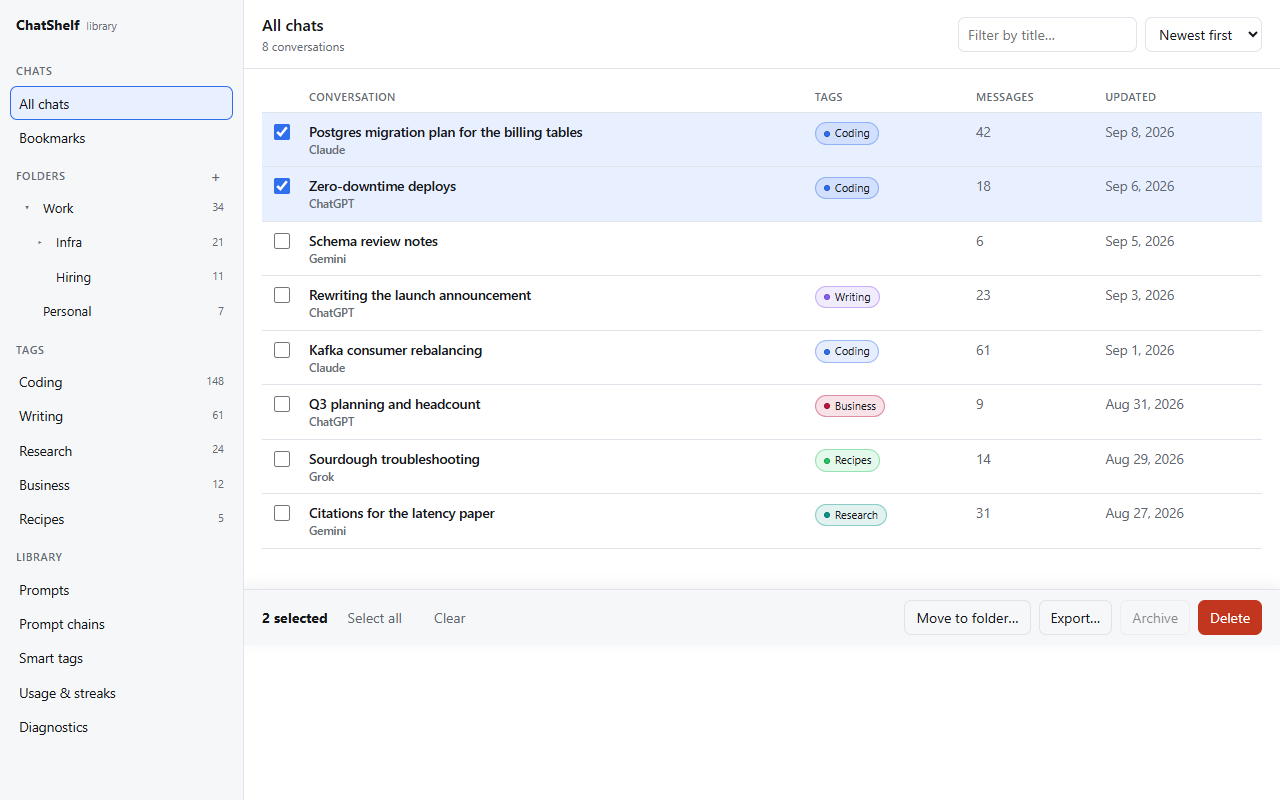
Nested folders that hold every assistant's chats together, smart tags, and bulk move / export / archive / delete.
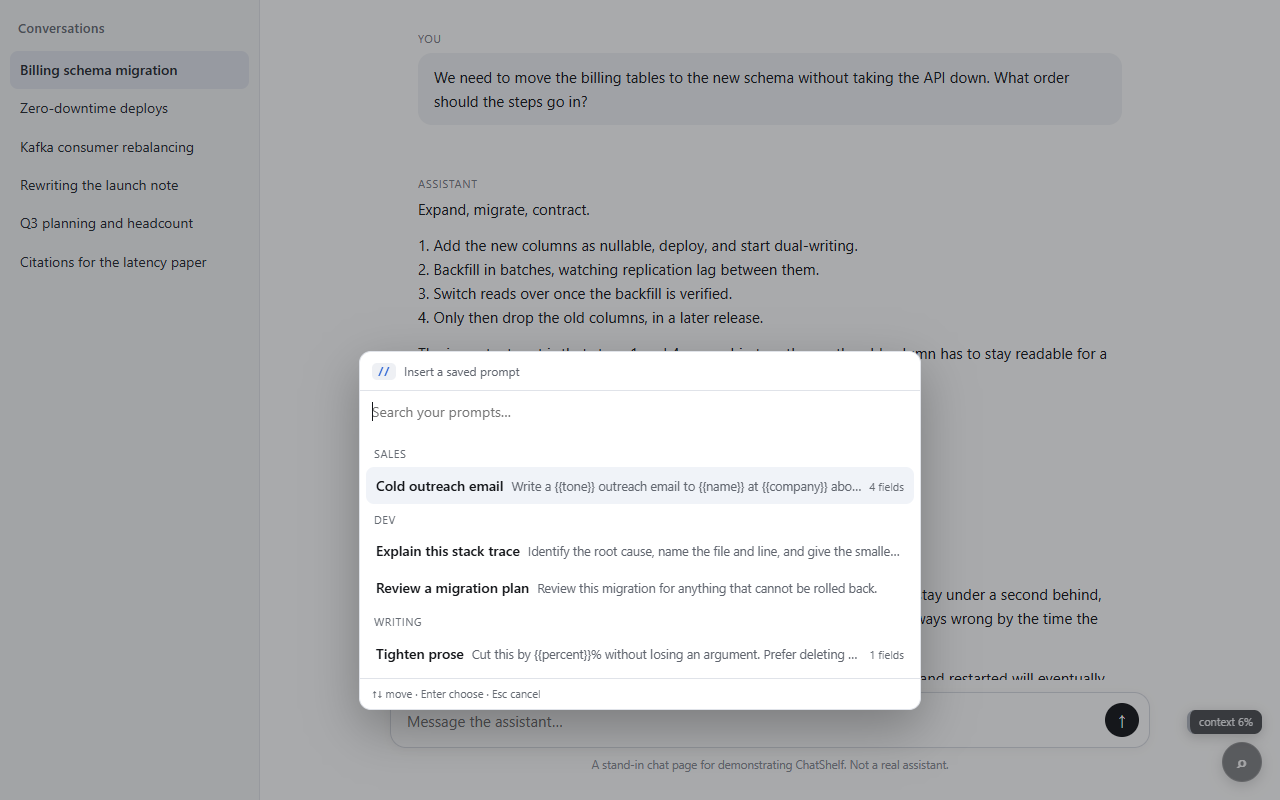
Saved prompts, grouped by category, with {{placeholders}} filled in right where you're typing.
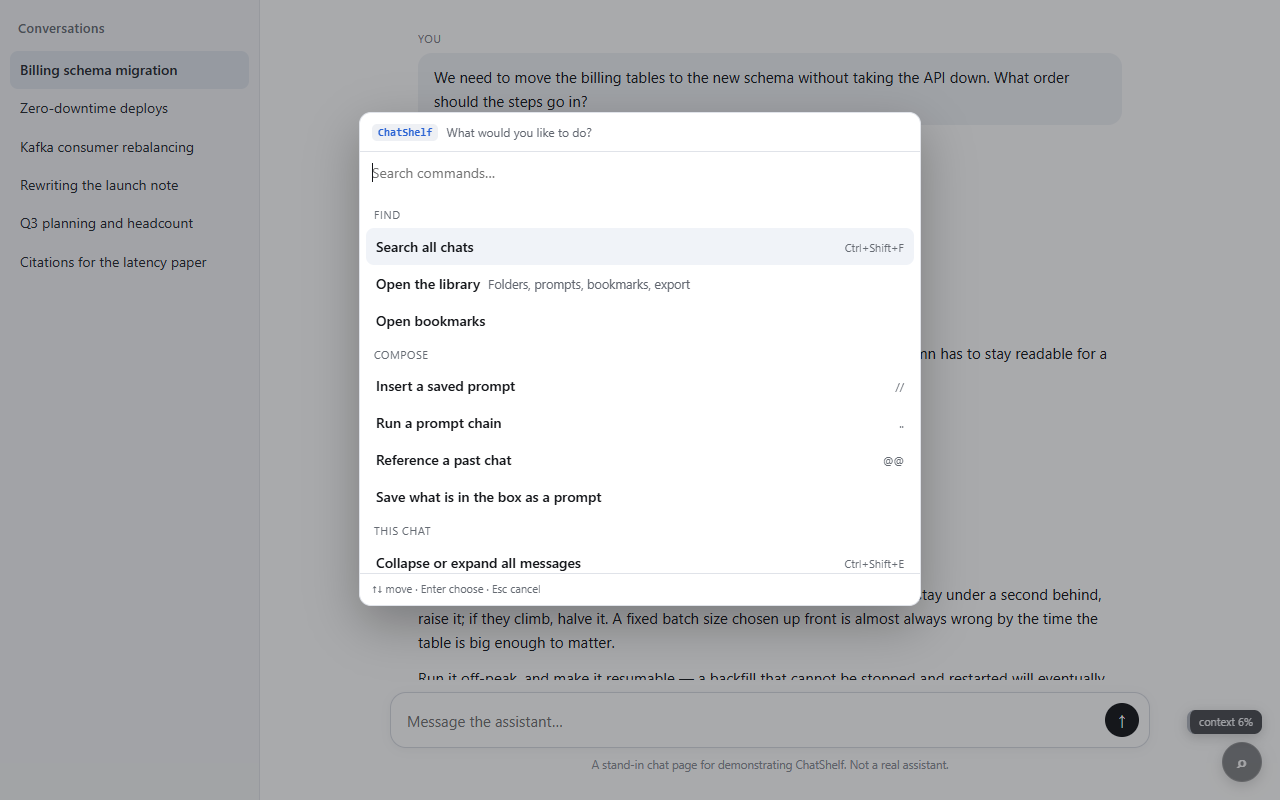
Every feature, one shortcut away — search, prompts, chains, folders and diagnostics, all in a fuzzy-searchable list.
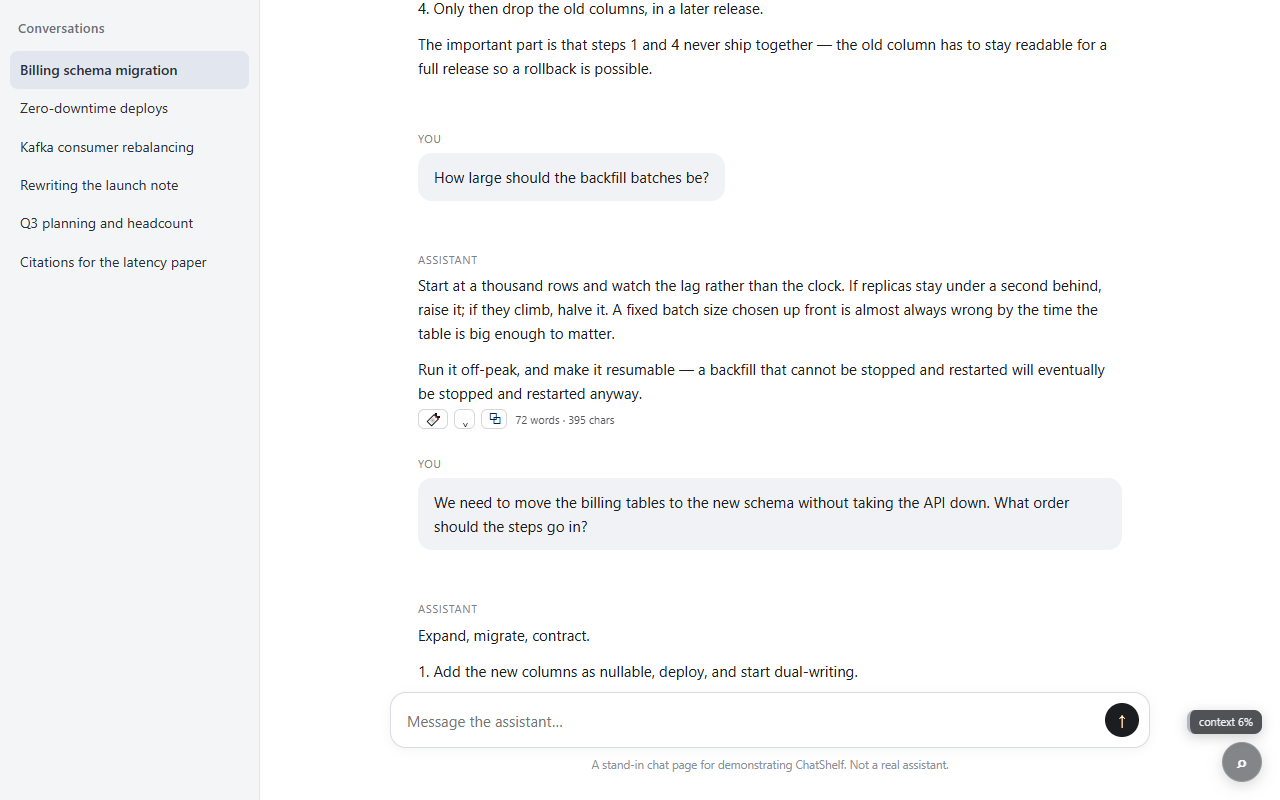
Hover any message for bookmark, collapse and copy controls — and keep an eye on the context meter, bottom right.
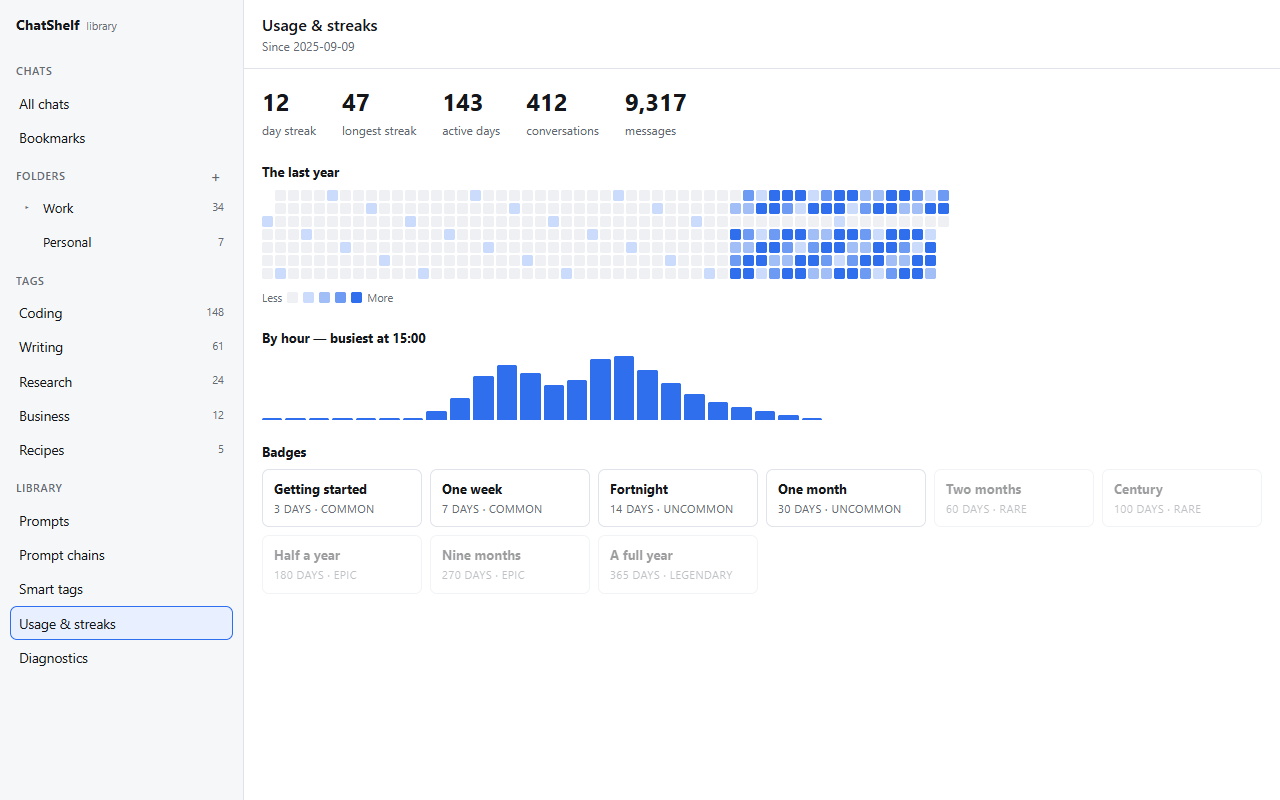
A year heatmap, an hourly histogram, and streak badges — all derived from indexing you were already doing.
Your conversations never leave your browser
ChatShelf isn't "privacy-friendly" as a marketing line — there is no backend for your chat data to reach. Search runs against an index built and stored on your device.
-
No server, no accountNothing to sign up for, nothing to lose if a company shuts down.
-
Indexed in your browser's own storageIndexedDB, on your machine — not uploaded anywhere, ever.
-
No analytics, no telemetryChatShelf doesn't know you exist, and that's on purpose.
-
Optional platforms ask firstClaude, Gemini and Grok access is off until you switch it on — and off again removes it.
Three steps, then it's just there
Install & pick your platforms
ChatGPT works immediately. Switch on Claude, Gemini or Grok from the popup — each asks Chrome for access only when you turn it on.
Browse like you already do
Every conversation you open gets indexed in the background. Import your whole history at once from the popup whenever you like.
Search, organize, export
Ctrl+Shift+F to search from anywhere, Ctrl+K for the command palette, or open the library for folders, prompts and bulk actions.
Stop scrolling. Start searching.
Free, forever, with nothing to install on a server you don't control.
Good to know before you install
Yes — every feature, for everyone, with no premium tier, no usage limits, and no account required. There's nothing to upgrade to.
ChatGPT, Claude, Gemini and Grok (both grok.com and Grok on x.com). ChatGPT is on by default; the other three are optional — turn them on from the popup whenever you want them.
In your browser's own local storage (IndexedDB), on your machine only. ChatShelf has no server, so there's nowhere else for it to go. See the privacy policy for the full detail.
Indexing happens quietly in the background and only reads the page you already have open — there's no continuous polling of a remote service, because there is no remote service.
Chrome deletes the extension's local storage along with it — folders, prompts, bookmarks and the search index all go. Your actual conversations on ChatGPT, Claude, Gemini and Grok are never touched, because ChatShelf only ever reads them.
No. ChatShelf is an independent project with no affiliation with or endorsement by any of those companies. It works alongside their products; it isn't one of them.
The extension has a built-in Diagnostics panel (open the library and look for it) that checks itself against the site you're on. If something still looks wrong, visit the Support page to get in touch.